
Google Reviews pricing
More Google reviews. Pay only when customers use the AI or voice.
Put a QR code on your counter. A customer scans it, taps their stars, answers a few one-tap questions and gets three drafts of their review, written from their own answers in their own language. They pick one, edit it if they like, and post it on Google.
- No monthly fee
- Unlimited for a year at ₹1,000 a branch
- On every plan, Pay as you go included
- 10 languages


What you pay for, and what you do not
The review page itself costs nothing to run. Pay per use when a customer gets AI drafts or speaks their review, or pay ₹1,000 a branch for a year of AI drafts with no per-use charge and cheaper voice.
Review page and QR flyer
₹0$0
included on every plan
Everything a customer needs to leave a review, without the AI.
- Your own review link and QR code, one per branch
- A printable flyer in A6, A5, A4 or a table tent, from 2 templates
- One-tap questions set for your industry, or your own
- Private notes from customers who rate 1–3 stars
- Pay per use
AI review drafts
₹5$0.1053
each time the AI writes drafts
The customer presses “Write my review” and gets up to three drafts to choose from.
- Three styles: short, detailed and warm
- Written only from the customer’s stars, answers and words
- 10 languages, plus Hinglish
- Same price on every plan, on your AI key or ours
Voice input
₹3$0.0632
per voice input
For a customer who would rather speak than type. They press “Speak instead” and talk.
- ₹2 on the Annual Pack
- Charged each time, whether the customer’s browser or our AI turns the speech into text
- Hidden when your balance cannot cover it
- The audio is never stored
- Unlimited for a year
Annual Pack
₹1,000$21
per branch, for a year
For one branch’s review page: AI drafts with no per-use charge, and voice input at ₹2, for a year from the day you buy it.
- Unlimited AI drafts
- Voice input at ₹2 instead of ₹3
- No per-draft charge, however many customers use it
- Each branch takes its own pack — mix packs and per-use across branches
- Your daily limits still apply
- After the year, back to ₹5 and ₹3 per use
Per-use charges come off your balance as they happen. The Annual Pack is ₹1,000 for each branch, the same on every plan. Prices exclude GST.
How it works
Four steps for your customer, with nothing to install — the review page opens in their phone’s browser.
- 1
Share your QR code
Print the flyer for your counter or reception, or send the review link to a customer after their visit.
- 2
They rate and answer
They tap their stars and answer a few one-tap questions about your staff, service and products — or speak instead.
- 3
The AI writes three drafts
Short, detailed and warm, from their own answers, in their language. ₹5 per set — or nothing extra on the Annual Pack.
- 4
They post on Google
They pick a draft and edit it if they like. One tap copies it and opens your Google review form.
See it working
From a scan to a posted review
This is the real page, on a real listing — ours. Your page carries your name, your logo, your colour and your own questions.
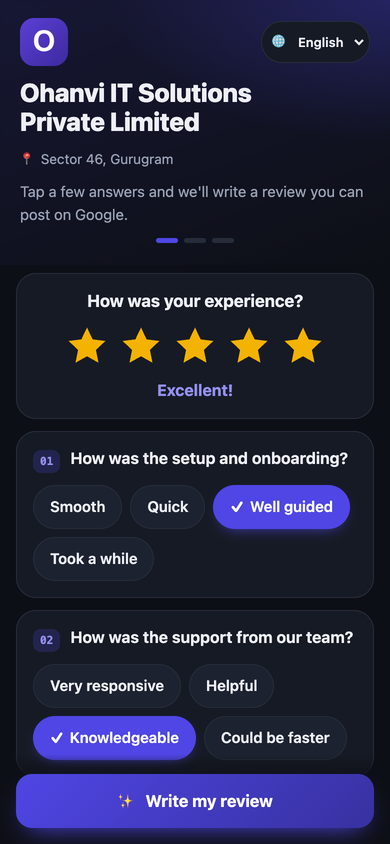
1Rate and tap
Stars first, then one tap per question. No typing needed — though they can add their own words, or speak them.
Pick your review
Written from your answers. Edit anything before you post.
- Short
Well-guided onboarding and a knowledgeable support team.
- Detailed
Setup and onboarding with Ohanvi IT Solutions in Gurugram was well guided from the first step, and the support team was knowledgeable whenever we needed them.
- Warm
Really happy with how well guided our onboarding was — and the support team clearly knows their stuff. Thank you!
2Pick a draft
The AI turns their stars and answers into three drafts. They pick one, change anything they like, and one tap copies it and opens Google.
Drafts shown are illustrations. Real drafts are written fresh for each customer, from their own answers.
Examples
The draft follows the stars
Two customers of the same imaginary clinic, two very different visits. A good visit reads naturally and names the business, service and area once each. A poor one stays plain and short — no promotion, nothing smoothed over.
Tapped
- Root canal
- Gentle
- On time
- Explained clearly
Draft
Had a root canal at Sunrise Dental in Kothrud. Gentle, on time, and the doctor explained every step clearly.
Tapped
- Long wait
- Helpful staff
Draft
Had a long wait past my appointment time. The staff were helpful once I was seen.
Illustrations for an imaginary business — not real reviews.
Your flyer
Print it, stand it up, done
The app designs a flyer for each branch with your name, logo and QR code on it. Download it and print it — no designer, no extra charge.
- Four sizes: A6, A5, A4 or a table tent
- 2 templates: Classic, with your own icons, or Your photo + QR, with your photo beside the code
- The QR colour is checked for contrast, so every phone can read it
- The same link works on WhatsApp, email, a receipt or your website

Try the live page
Scan with your phone camera, or open the link — this is our own review page, exactly as a customer sees it.
Open the review pageBuilt to stay on the right side of your customers
- Every customer sees the same “Post on Google” button, whatever they rate. A 1–3 star customer can also send you a private note — it sits below the Google button and never replaces it.
- Drafts never invent a detail and never state a star count. A 1–3 star draft stays plain, with no promotion.
- Set a daily limit on AI drafts and voice inputs for each page — 200 and 100 a day to start, anywhere from 1 to 1,000.
- If your balance runs out, the page still works: the customer writes their own words and posts them.
Questions, answered
How much does Google Reviews cost?
There is no monthly fee, on any plan. The review page, the QR flyer and private notes are included. Then choose how to pay for the AI: per use — ₹5 each time it writes drafts for a customer (up to three, in one go) and ₹3 each time a customer’s spoken review is turned into text, whether their browser or our AI does it — or ₹1,000 a branch for the Annual Pack: a year of AI drafts on that branch’s page with no per-use charge, and voice input at ₹2. Prices exclude 18% GST.
Should I take the Annual Pack or pay per use?
The Annual Pack is unlimited: ₹1,000 for a branch, and for a year every set of AI drafts on that branch’s review page is included, however many customers ask for one — no ₹5 per-draft charge. Voice input on the pack is ₹2 instead of ₹3. On per-use pricing you pay ₹5 for each set of drafts and ₹3 for each voice input, and nothing in a month nobody uses them. You can choose branch by branch — a pack for your busiest one, per use for the rest.
What happens when the Annual Pack’s year ends?
AI drafts and voice input go back to per-use pricing — ₹5 and ₹3 — from your balance. The review page, your QR flyers and your links keep working exactly as before; you can take another pack whenever you like.
Am I charged for every customer who scans the QR code?
No. Scanning, rating, answering the questions and posting on Google cost nothing. On per-use pricing you are charged only when a customer presses “Write my review” and the AI writes drafts (₹5), or when a customer’s spoken review is turned into text, by their browser or by our AI (₹3). On the Annual Pack, drafts are not charged and voice input is ₹2.
Can a busy day run up a large bill?
Only as large as you allow. Each review page has a daily limit on AI drafts and on voice inputs — 200 drafts and 100 voice inputs a day to start — and you can set each anywhere from 1 to 1,000. Once the day’s limit is reached, customers can still write and post their own review. On the Annual Pack a busy day adds no draft charges, and the limits still apply.
Does it only send happy customers to Google?
No. Every customer sees the same “Post on Google” button, whatever they rate, and it works the same way for every rating. A customer who gives 1–3 stars can also send you a private note, but that sits below the Google button and never replaces or disables it. The customer posts from their own Google account and can rewrite the draft first.
Will the drafts make things up?
No. Drafts are written only from what the customer gave: their stars, the answers they tapped, the staff or products they picked, and their own words. They never state a star count. A 4–5 star draft reads naturally and mentions your business name, service and area once each; a 1–3 star draft stays plain — one or two sentences, with no promotion.
Which languages can customers use?
10: English, Hindi, Marathi, Gujarati, Bengali, Tamil, Telugu, Kannada, Malayalam and Punjabi, plus Hindi in English letters (Hinglish). The customer can switch language on the page, and the drafts are written in the language they choose.
Do you keep the customer’s voice recording?
No. The customer’s speech is turned into text and the audio is dropped. It is never stored, and never logged.
What if my balance runs out?
The review page keeps working. The AI drafts are skipped, and the customer writes their review in their own words and posts it on Google as usual.
Do I need a Google Business Profile?
You need a Google listing for customers to review. Find your listing by name, or paste your Google review link. The “Post on Google” button goes to that listing.
Can each branch have its own QR code?
Yes. Each branch gets its own review page, link, QR flyer and daily limits, and you see each branch’s numbers separately. The Annual Pack is per branch too: ₹1,000 a year for each branch you want unlimited drafts on.
Other add-ons
Automation packs
A thousand more bot messages, AI replies, or both, when you outgrow your plan.
From ₹499$11 for 1,000
See pricingMarketing commitment
Pay up front for a block of marketing messages and get a bigger plan’s lower rate.
From ₹1,299$27 for 10,000 messages
See pricingWhatsApp Calling
Call customers on WhatsApp from the team inbox. Paid per minute of talk time.
From 70 paise$0.0074 a minute, to India
See pricingSpeak and Translate
Speak or type in your language, reply in your customer’s. 56 languages.
From 20 paise$0.0042 a translation
See pricing